How I designed a digital service and MOT inspection app for technicians across 200+ branches, connecting workshop data with clear online approvals for customers.
Role: Lead Product Designer
Scope: Discovery through to launch
Product: Workshop technician app and customer work-approval journey
Research: Site visits, shadowing, interviews, co-design and live pilot testing
Collaborators: Product, engineering, compliance, aftersales and workshop teams
Scale: Rolled out across 200+ branches
Summary
I led the design of a digital workshop inspection process to replace paper-based service and MOT checks.
The challenge was not simply moving a form onto a screen. Technicians needed to complete inspections quickly and accurately, and the business needed consistent, auditable information. Customers needed clear explanations before approving additional work online.
Early research produced a workflow that appeared logical and tested well. Once technicians used it at normal working speed, however, part of the tyre inspection process interrupted a task they normally completed through instinct and muscle memory.
By observing technicians in the workshop, I identified the cause and redesigned the flow around how they physically moved around a vehicle. I also separated the information technicians needed to record from the information customers needed to make a decision.
The final product replaced paper-based processes across more than 200 branches and connected workshop inspections with the online customer approval experience for the first time.
Replacing paper without disrupting the workshop
Technicians traditionally recorded service and MOT checks on paper. The process was familiar, flexible and fast, but it made information harder to audit and limited how effectively it could be shared with customers.
The business wanted to:
- Improve consistency and auditing across workshops
- Give technicians a reliable digital workflow
- Allow customers to review and approve recommended work online
- Present technical inspection data in language customers could understand
This meant designing two connected experiences with very different users.
Technicians needed speed, clarity and flexibility. Customers needed context, confidence and enough information to make an informed decision.
I owned both sides of the journey, allowing me to design how information was captured in the workshop and how it was translated for customers.
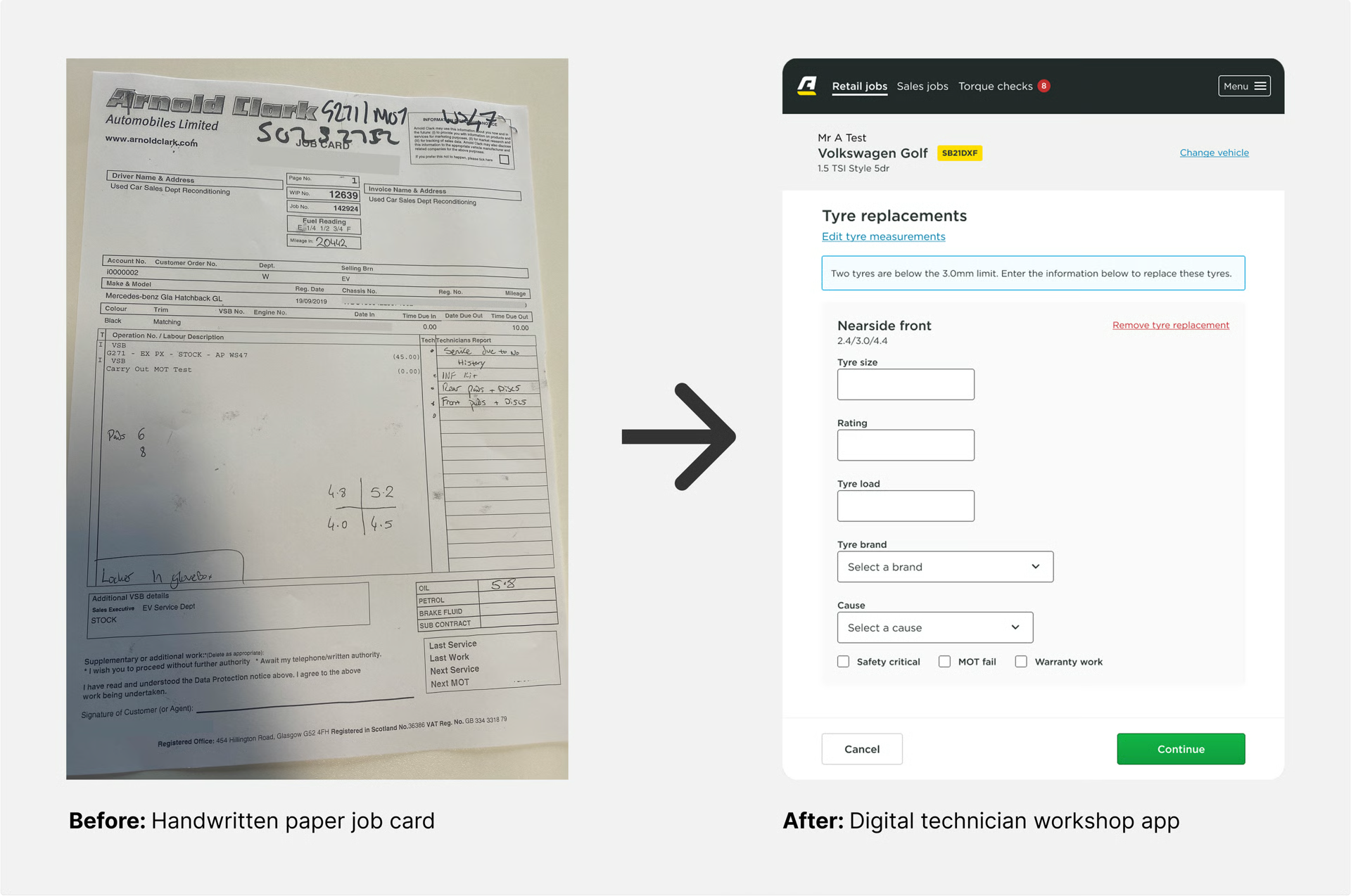
Understanding the workshop
I visited branches, shadowed technicians, conducted interviews and involved workshop teams in co-design sessions.
This helped us understand the terminology technicians used, the information they recorded and the different conditions in which inspections took place.
For tyre inspections, technicians referred to each position using abbreviations:
- NSF: nearside front
- OSF: offside front
- NSR: nearside rear
- OSR: offside rear
Customers didn’t understand these terms. They were more comfortable with front driver, front passenger, rear driver and rear passenger.
We designed the system to let technicians use familiar workshop terminology while translating the same information into customer-friendly language later in the journey.
The initial tyre flow
The first design presented four tyre inputs in a simple vertical sequence:
- NSF
- OSF
- NSR
- OSR
Each tyre included structured fields for details such as tread depth, condition and replacement information.
The approach appeared sensible. It followed the terminology technicians gave us, created consistent data and worked during early validation.
However, live use revealed something the initial research had missed.
What happened at working speed
Technicians didn’t experience the task as a list of four tyre positions. They experienced it physically.
They walked around the vehicle in a loop, checking each tyre as they reached it. The order of the digital form forced them to move from side to side and front to back, interrupting their natural route around the car.
The additional structured inputs also required experienced technicians to stop and consciously record parts of an assessment they normally completed almost instinctively.
The interface was understandable, but it didn’t fit the physical rhythm of the work.
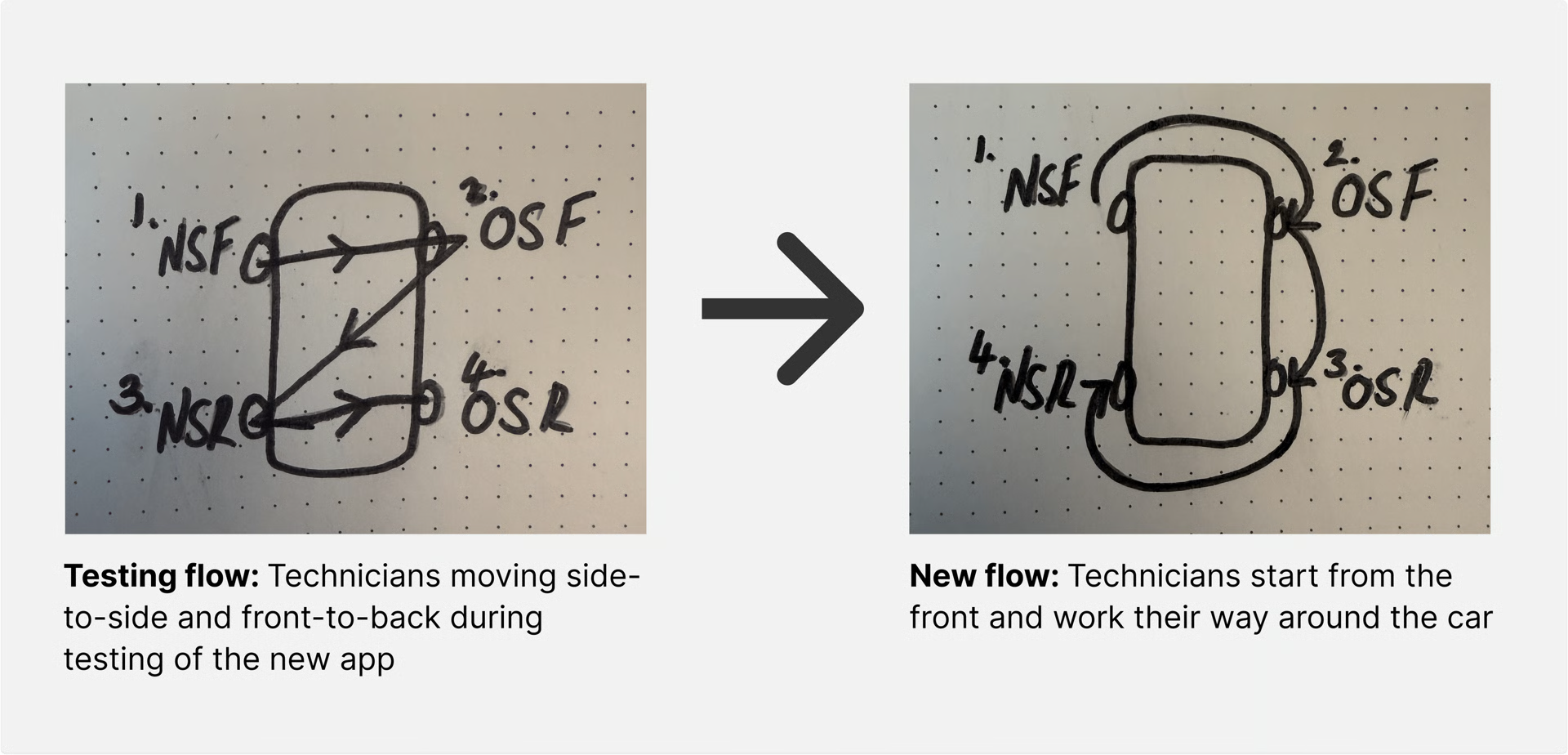
That distinction mattered. Asking technicians how they completed an inspection gave us the correct terminology and information requirements. Watching them perform the task at full speed revealed the behaviour the interface needed to support.
Reframing the problem
The question was no longer:
How do we reproduce the paper inspection digitally?
It became:
How do we capture reliable, auditable information without interrupting an expert workflow?
That reframing helped align product, engineering, compliance, aftersales and workshop teams around a shared objective.
More structure was not automatically better. Every additional field or enforced step needed to justify the time and attention it required from technicians.
What I changed
Matched the physical inspection route
I reorganised the tyre inputs to follow the order technicians naturally encountered as they moved around the vehicle.
This removed the unnecessary zig-zag created by the original sequence and made the digital flow correspond with the physical task.
Reduced unnecessary input
I challenged which fields genuinely needed to be mandatory and introduced a lighter way for technicians to record tyre outcomes.
The revised design retained the information required for transparency and auditing while reducing interruption during the inspection.
Designed different views of the same data
Technicians and customers didn't need identical interfaces.
The technician experience prioritised quick input using familiar language. The customer experience translated that information into recognisable tyre positions, clearer explanations and replacement guidance.
This allowed technicians to work efficiently without passing workshop terminology or raw technical data directly to customers.
Tested in real working conditions
I returned to live inspections and tested the revised flow while technicians worked at their normal pace.
This was important because a moderated test could confirm that someone understood the interface, but it could not accurately reproduce the speed, movement and competing demands of a working workshop.
Connecting the workshop to customer decisions
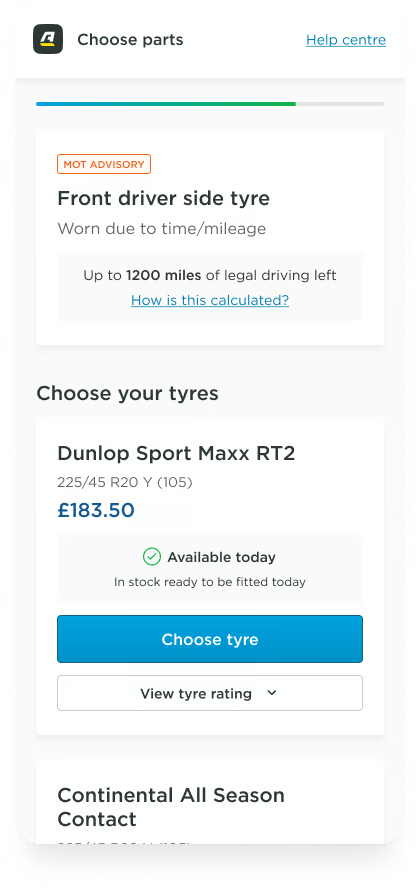
The information technicians recorded was used to explain recommended work to customers online.
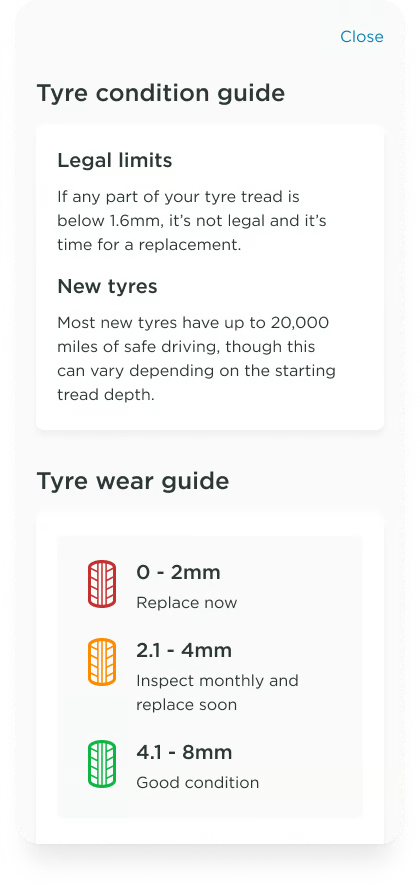
Rather than presenting technical codes alone, the customer experience showed:
- Which tyre needed attention
- Where it was positioned on the vehicle
- Its recorded condition
- Why replacement was being recommended
- The available replacement options
This gave customers enough context to make an informed decision while keeping the technician workflow focused on efficient and accurate data capture.
Outcome
The workshop application replaced paper-based inspection processes across more than 200 branches.
The revised tyre flow better matched how technicians moved around vehicles, removed unnecessary input and retained the audit trail required by the business. Live testing showed that the workflow could support technicians at normal working speed without forcing them to abandon familiar inspection behaviour.
The connected online work-approval journey supported £33 million in annual aftersales revenue, an increase of £3 million year on year. I couldn't attribute that commercial performance to the redesign alone, but it demonstrates the scale of the wider service the workshop data supported.
The tyre-flow change was not measured independently, so its outcome is primarily qualitative. If I were measuring it again, I would establish a baseline for inspection time, corrections and incomplete submissions before comparing the original and revised flows across several branches.
What I learned
Focus on what users do, not just what they say
Technicians could explain the information they recorded, but much of their physical workflow was instinctive. Direct observation exposed behaviour that interviews and conventional usability testing didn’t.
The environment shapes usability
An interface can be clear and still be wrong for its environment. For operational products, movement, interruptions and working pace are part of the user experience.
Don’t give every user the same information
Technicians and customers needed the same underlying data presented in different ways. Separating their needs kept the workshop efficient while giving customers the context they needed to make an informed decision.
Structure should make the work easier, not slower
Structured data improved consistency and auditing, but unnecessary structure added cognitive load. The right design balanced business control with professional judgement rather than treating one as more important than the other.